Field notes · Look · Try · Compare
Making a subject index for a photo collection
Help readers find photographs through simple subject words and links.
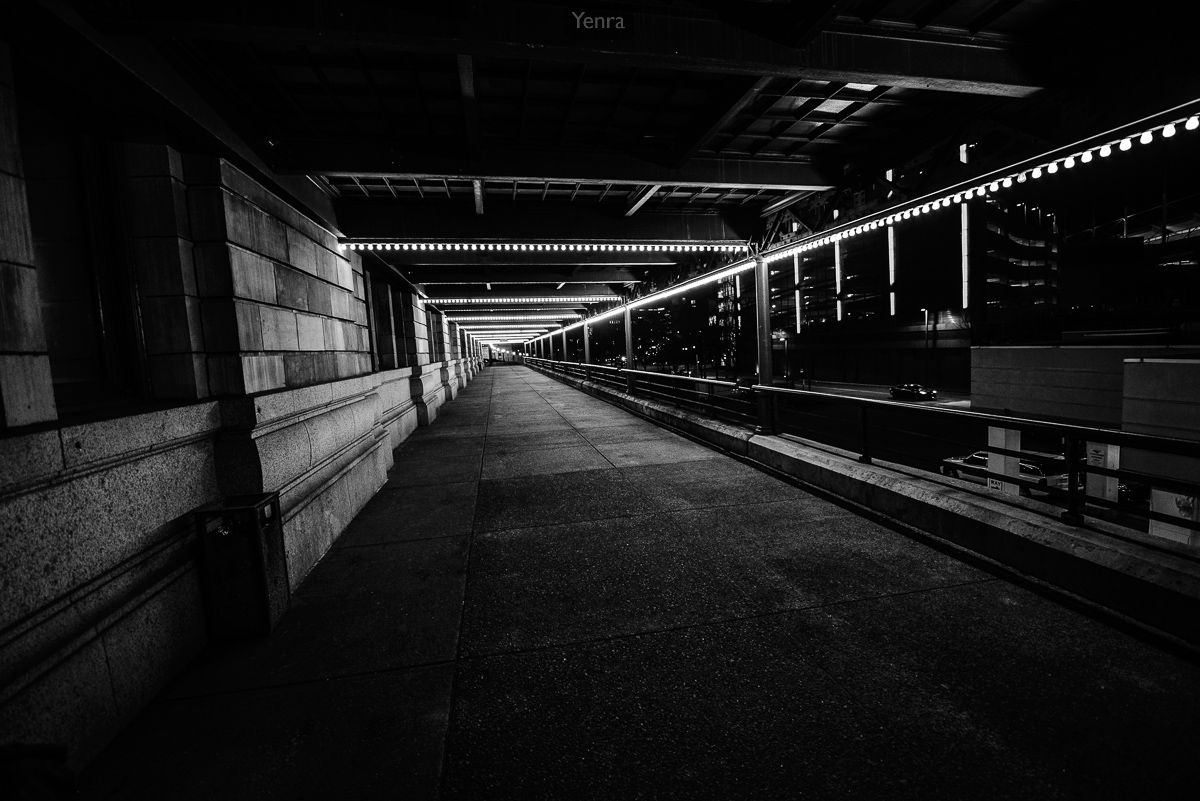
Pennsylvanian at Night, Pittsburgh · Photograph: Yenra
Captured: 2018:04:05 21:12:16
A subject index gives someone another way to enter a photo collection. Instead of beginning at the first picture, a reader can choose a word for something they would like to find. One photograph can have several useful routes into it.
This small example uses three existing Tekko 2018 photographs. The subject labels are new editorial descriptions of visible content. They sit alongside the photographs and their original records, leaving the archive's titles, keywords and order intact.
Choose a plain subject label
The covered walkway includes a stone wall, a railing and repeated rows of lights. “Architecture” is one plain subject word that can help someone find it. A more detailed collection might also use “Walkways” or “Night photographs.”
Begin with words that a reader is likely to recognize. You can write several possibilities before choosing a small set. The purpose is to make a photograph easier to find, so a clear familiar label is a useful starting point.
Keep the scope of the index visible. Here, the three subject entries refer only to the three pictures in this lesson. They do not claim to describe every photograph in the Tekko archive.
Let one photograph belong to several entries

Sara Crispino, Yuri on Ice · Photograph: Yenra
Captured: 2018:04:06 13:26:47
This portrait appears through a reflection in glass, with structural lines crossing the image. Both “Portraits” and “Reflections” can lead a reader to it. The photograph needs to appear only once in the collection.
That overlap is useful. A reader interested in portraits can arrive through one subject word, while someone exploring reflections can arrive through another. Each entry points to the same complete picture and its source record.
Choose labels for what you can see or reliably establish. A subject index does not require guessing a person's identity, feelings or role. Keep supplied names and credits with the photograph, and let straightforward visual subjects do the work of guiding the reader.
Test the index as a reader

Urban Landscape · Photograph: Yenra
Captured: 2018:04:07 13:29:42
Yellow bridges cross a river beside city buildings. Reflected shapes appear in the water, with faint reflections also visible across the glass in front of the view. This photograph can be found under both “Architecture” and “Reflections.”
The index below puts its three subject words in alphabetical order. Each link names the figure it leads to, so you can try it and see whether the destination matches your expectation. Figure 1 is near the beginning of the page; the links can take you back there as well as farther down.
A contents page usually follows the order of chapters or photographs. A subject index offers a different route through the same material. You can keep both when they help readers in different ways.
For your own collection, begin with three photographs and a few words on paper. Combine labels that mean the same thing, put the remaining words in alphabetical order, and write the picture numbers beside them. On a webpage, those numbers can become links.
Try finding a photograph from a subject word without looking through the whole collection first. If an entry feels unclear, change the wording or add another useful route. A small index can grow with your pictures while remaining simple enough to use.
Look back with curiosity.
- Which words would help a reader find a picture?
- Which photograph belongs under more than one subject?
- Does every index entry lead to the photograph you expect?
Keep exploring
Making a visual contents page for a photo collection · Adding a simple timeline to a photo collection
Browse the complete Tekko 2018 gallery.