Field notes · Look · Try · Compare
Making a portrait with headphones
Explore the shapes beside a face, a wider gesture, and the surroundings with familiar headphones.

Rise Kujikawa, Persona 4 · Photograph: Yenra
Captured: 2014:01:03 16:26:55
Headphones bring a recognizable shape close to the face. They can add color, echo a curve, or become part of a wider gesture. Invite a willing model to try a familiar pair and explore how much room they receive within the portrait.
Notice the shapes beside the face
In this Rise Kujikawa costume portrait, yellow ear cups sit on either side of the model's face. Dark hair surrounds them, and a large pink patterned bow rises above. The closer framing lets you see those relationships clearly.
Look at the space around the eyes, hair, and ear cups. The yellow shapes are easy to find without becoming the only thing to look at. The face, costume colors, and hand on the hip all remain part of the picture.
Start your own portrait with headphones or a headset you already have. Let the model choose a comfortable position and leave room for their hair and the headband. Ordinary clothes work well; the costume here offers one example of the shapes you can explore.
The photographs show costume headphones, without establishing whether music was playing or whether the prop works. Your own session can be quiet. What matters for this exercise is the visible relationship between the face and the object beside it.
Include the headphones in a wider gesture
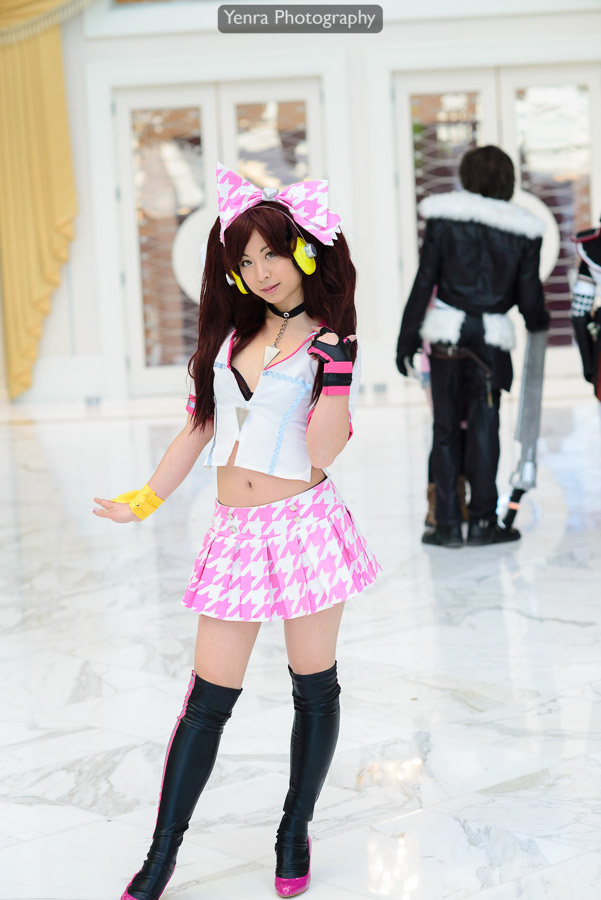
Rise Kujikawa, Persona 4 · Photograph: Yenra
Captured: 2014:01:03 16:26:48
The full-length view brings the patterned skirt, dark boots, and standing gesture into the photograph. The yellow headphones become smaller within the whole frame, but their color still helps you find them beside the face.
Notice how stepping back changes the task. You now have more of the model's gesture and more of the setting to include. Look at the space above the head, the hands, and where the feet meet the edge of the picture.
Invite your model to suggest a gesture they enjoy. They might rest a hand, turn a little, or simply stand comfortably. There is no need to touch the headphones or repeat the pose in the example. Make a wider photograph and see what the extra room contributes.
Compare it with your closer portrait. In one, the ear cups may feel like a frame around the face; in another, they may become a small accent within the whole figure. Both are useful possibilities to keep.
Compare the surroundings around the head
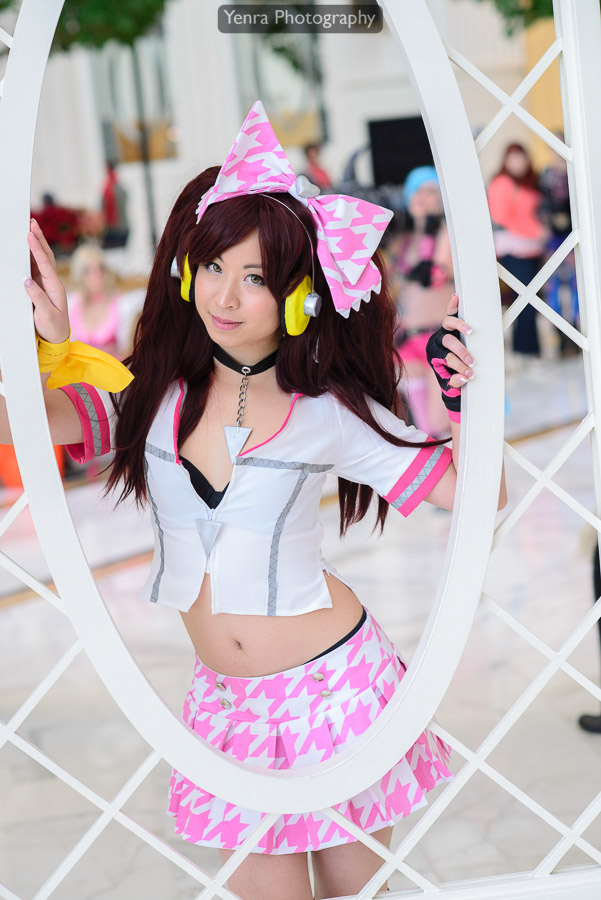
Rise Kujikawa, Persona 4 · Photograph: Yenra
Captured: 2014:01:03 16:29:44
Here the model holds the sides of a white oval gazebo opening. The oval makes a larger frame around the portrait, while the yellow ear cups remain two smaller shapes beside the face. The surrounding lattice adds still more lines to explore.
Trace the large oval, then return to the face. Notice where the bright white structure sits beside the hair and where softer background colors appear through the opening. The headphones remain readable within a busier arrangement.
You can explore this question with an ordinary background. Move a little to one side, or choose a simpler area behind the model, and make another portrait. Watch how the headphones sit against light and dark shapes. Change one thing at a time so the comparison remains easy to enjoy.
Review the closer and wider pictures together. Ask your model which position felt comfortable and which photograph they would like to explore further. Keep a version you both enjoy and a short note about the balance of face, headphones, and surroundings.
Look back with curiosity.
- What shape or color do the headphones add near the face?
- What becomes visible when you step back?
- Which background helps the portrait feel clear?
Keep exploring
Exploring props in a portrait · Making a portrait with glasses · Choosing a portrait background
Browse the complete MAGFest 2014 gallery.